
Core Concepts
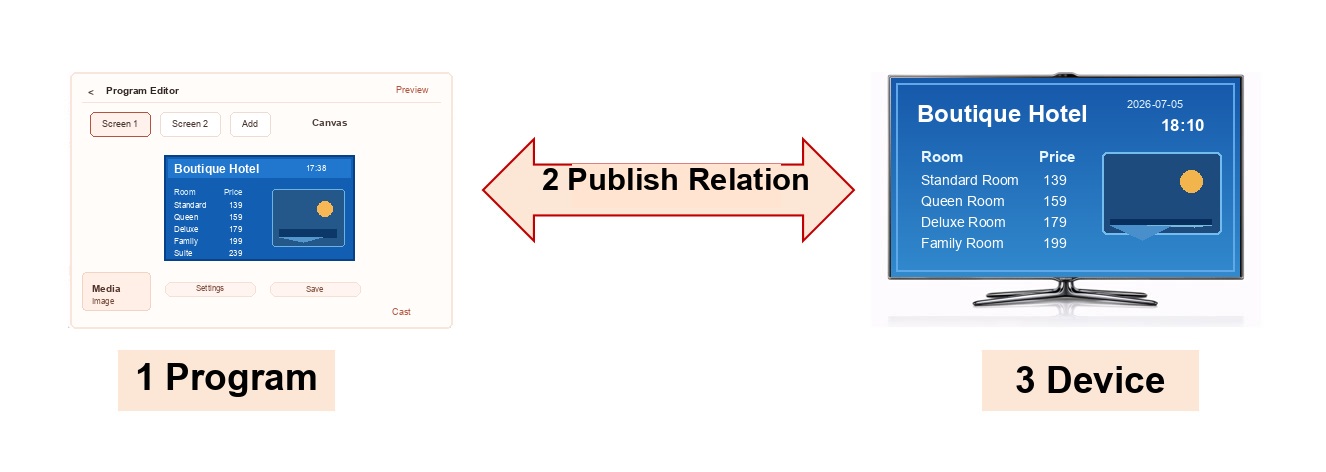
For many first-time users, the hardest part is not clicking buttons. It is understanding what these three terms actually mean:
Program, Device, and Delivery Relationship.
You can understand the whole system with one very simple sentence:
First create a program, then prepare the device, and finally deliver the program to the device for playback.
So in real use, the core logic can be understood as just 3 parts:
- Program Editing
- Device Management
- Delivery Relationship
When creating programs, you will also often use one supporting concept: My Media Library. It is not a standalone playback target. It is the source of media used to build programs.
1. What is a program?
A program is the content that a device will finally play.
You can think of it as:
- one display page shown on a screen
- or one set of display content prepared for playback
A program can contain:
- images
- videos
- text
- web pages
- PDFs
- music
- other media
A program can also use split-screen layouts, meaning one screen can be divided into multiple regions and each region can display different content.
If you want a more detailed structure:
- Program = the top-level playback unit
- Child Screen = one display region inside the program
- Media = the actual content played inside that region
But for a new user, the most important thing to remember is:
A program is what you ultimately want the device to play.
Learn more about Program Editing
2. What is My Media Library?
My Media Library is where uploaded and imported media files are stored and managed.
You can think of it as:
the media storage used while creating programs.
Common media includes:
- images
- videos
- audio files
- PDFs
- documents
- other uploaded or imported files
When editing a program, you can select existing media from My Media Library or upload new media. The same image, video, or document can be reused in multiple programs, so you do not need to upload it again every time.
Keep these points in mind:
- Media in the library is not delivered directly to devices for playback
- Media must be added to a program before a device can play it
- One media file may be used by multiple programs, so check whether it is still referenced before deleting it
- Media that is no longer used by any program can be cleaned up to reduce storage usage
You can remember it like this:
- My Media Library = where the raw materials are stored
- Program = how those materials are arranged into playable content
- Delivery Relationship = which devices receive and play the program
3. What is a device?
A device is the actual terminal that displays the content.
For example:
- a TV
- a signage device
- a tablet
- a set-top box
- a Windows PC
- or any other device with the Player installed
These devices must first be recognized, bound, and managed inside the system before they can receive and play programs.
So device management mainly answers questions like:
- Has the device been added to the system?
- Is the device currently online?
- Which store, group, or customer does the device belong to?
- Has the device been bound already?
- Can the device be managed remotely?
You can think of a device as:
the screen terminal that is actually responsible for displaying the content.
Learn more about Device Management
4. What is a delivery relationship?
A delivery relationship means:
which program is played on which device, and how it is played.
It is the connection between programs and devices.
For example:
- one program delivered to multiple devices
- multiple programs delivered to one device
- different programs played at different times on the same device
So a delivery relationship is not just a simple binding. It also determines:
- which devices receive a program
- which programs a device plays
- playback order and playback time
- whether time-based scheduling is used
You can think of it as:
the playback rule between programs and devices.
Learn more about Delivery Relationships
5. How do these concepts work together?
The simplest explanation is:
- First, prepare media
- Then, create a program
- Then, prepare the device
- Then, create the delivery relationship between the program and the device
- After that, the device plays according to the settings
You can also remember it like this:
- My Media Library = where the raw materials are stored
- Program = what to play
- Device = where to play it
- Delivery Relationship = how to send and play it there
6. The easiest way for new users to understand it
If this still feels abstract, use a simple example:
- You upload menu images, product videos, and promotion posters -> those are stored in My Media Library
- You use those media files to create a "milk tea shop digital menu" -> that is the program
- The TV in your store -> that is the device
- You deliver that digital menu to the TV and set it to play during business hours -> that is the delivery relationship
Another example:
- You create 3 programs: breakfast menu, lunch menu, and dinner menu
- You have 10 TVs across your stores
- You deliver those 3 programs to the 10 TVs and switch them by time
In that example:
- menu images, product videos, and posters = media
- breakfast/lunch/dinner menus = programs
- the 10 TVs = devices
- which TV plays which menu and when it switches = delivery relationship
7. What should new users read first?
If this is your first time using the system, the recommended order is:
- Read Program Editing first, because you need to know what you want to play
- Then read Device Management, because you need to know where the content will be played
- Then read Delivery Relationship, because it determines how playback is assigned
If you have not started operation yet, it is also useful to read: